Modern businesses need reliable technology to keep their daily operations running smoothly. However, working in construction sites, factories, warehouses, and outdoor environments can expose computers to dust, vibration, accidental drops, and changing weather conditions. Standard computers may not always be suitable for these demanding workplaces.
A Getac computer is designed for professionals who require dependable computing in challenging environments. Getac offers rugged laptops, tablets, and other mobile computing solutions that support fieldwork, industrial operations, logistics, and technical services. Choosing the right device can help businesses improve productivity and access important information wherever work takes place.
What Is a Getac Computer?
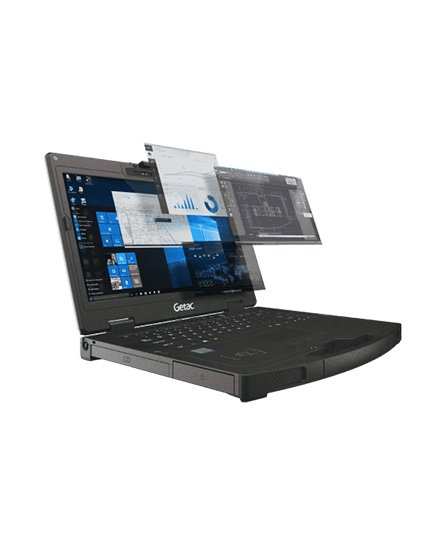
Getac is a technology brand known for producing rugged computing devices for professional and industrial applications. Its product range includes fully rugged laptops, semi-rugged computers, and rugged tablets designed for different working conditions.
These devices are developed to support employees who need reliable technology outside traditional office environments. Depending on the model, features may include reinforced construction, spill-resistant keyboards, sunlight-readable displays, and protection against dust and moisture.
A suitable Getac device can help field technicians, engineers, maintenance teams, and other professionals perform their tasks more efficiently. However, specifications and protection levels vary between models, so businesses should compare individual products before purchasing.
Key Benefits of Choosing a Getac Computer
Rugged Design for Demanding Workplaces
Durability is one of the main reasons businesses consider rugged computers. Workers in construction, manufacturing, transportation, and outdoor services may operate in environments where equipment experiences frequent movement and challenging conditions.
Selected Getac models are designed to withstand specific levels of impact, vibration, dust, and moisture. Their protective construction can help reduce the risk of equipment damage when devices are used according to the manufacturer’s guidelines.
Before choosing a model, review its published durability ratings and operating temperature range to confirm that it suits your workplace.
Reliable Performance for Business Applications
A rugged computer must offer enough processing power to handle the software used by your team. Depending on the configuration, Getac computers can support business applications, digital documentation, inventory systems, equipment diagnostics, and field reporting.
When comparing models, consider the processor, RAM, storage capacity, operating system compatibility, and graphics requirements. Businesses using specialised engineering or diagnostic software should also confirm that the selected configuration supports their applications.
Choosing suitable specifications can help employees work efficiently without paying for unnecessary hardware capabilities.
Display Visibility for Outdoor Work
Professionals who work outdoors often need to view documents, maps, inspection reports, and technical information under bright sunlight.
Some Getac computers feature displays designed to improve visibility in outdoor environments. This can be useful for construction supervisors, field engineers, utility workers, and maintenance technicians.
Screen size, brightness, touchscreen functionality, and glove-compatible operation can vary by model. Consider your working environment and the type of information employees need to view throughout the day.
Connectivity for Mobile Teams
Field employees frequently need to share information with colleagues, update records, and communicate with central offices. Depending on the model and configuration, Getac devices may offer Wi-Fi, Bluetooth, cellular connectivity, GPS, and various physical ports.
These options can support mobile workflows and help teams access business systems from different locations.
Before purchasing, identify the connectivity features your organisation requires. Cellular connectivity, GPS, and specialised ports may be optional or unavailable on particular configurations.
How to Choose the Right Getac Computer
Selecting the right device starts with understanding your business requirements.
Consider Your Working Environment
A fully rugged computer may be appropriate for demanding industrial or outdoor conditions, while a semi-rugged model may suit workplaces with less severe exposure. Review environmental ratings rather than relying on appearance alone.
Compare Available Models
Getac offers different devices for different professional needs. Rugged laptops are suitable for users who need a traditional keyboard and larger screen, while rugged tablets may be more practical for mobile inspections, equipment checks, and on-site data collection.
Consider portability, screen size, accessories, and the applications your employees use daily.
Check Battery Life
Battery performance is important for employees who work long shifts away from power outlets. Compare manufacturer battery estimates and available battery options, keeping in mind that actual runtime depends on workload, screen brightness, connectivity, and environmental conditions.
Review Warranty and Support
Business buyers should also consider warranty coverage, repair services, spare parts, and long-term product support. These factors can influence the total cost of ownership and help organisations plan for future maintenance.
Industries That Use Getac Computers
Getac rugged computing solutions can be useful across several industries.
- Construction: Access project plans, site reports, and inspection records.
- Manufacturing: Support equipment maintenance, production monitoring, and technical documentation.
- Transportation and logistics: Manage fleet information, inventory, and delivery records.
- Utilities: Assist field teams with inspections, maintenance, and service documentation.
- Public safety: Support authorised personnel who need mobile access to operational information.
- Engineering: Run compatible applications and collect technical data in the field.
The right device depends on the specific software, connectivity, and environmental protection requirements of each industry.
Why Buy a Getac Computer from a Trusted Supplier?
Purchasing from a reliable rugged computing supplier can make it easier to compare specifications and select a suitable configuration. A knowledgeable supplier should explain available models, accessories, warranty terms, and compatibility requirements.
When evaluating a Getac computer, confirm whether the device is new or refurbished and request clear information about its condition. For refurbished equipment, check battery health, included accessories, warranty coverage, and return policies.
Comparing these details can help you make a more confident purchasing decision.
Conclusion
A Getac computer can be a practical choice for businesses that require reliable computing in challenging working environments. Its rugged laptop and tablet options support a range of professional applications, from construction and manufacturing to logistics and field services.
By comparing durability, processing power, display quality, connectivity, battery performance, and support options, you can identify a device that matches your operational needs. Choosing the right rugged computer can help your team stay connected, organised, and productive wherever work takes place.